
Call Zapper1.1 - App Store
You'll be able to see results in few seconds.
Publisher Description
Disclaimer: This app is for purely entertainment purposes only.
Please make sure your MUTE button is not enabled.
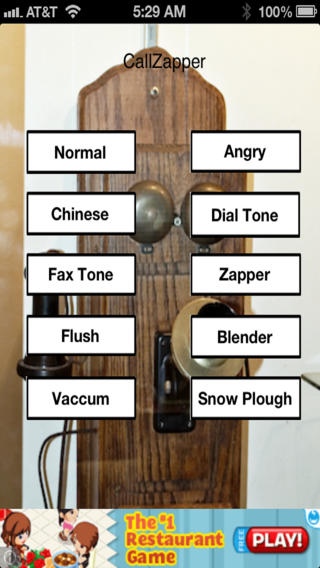
Here is a App to help you fight unwanted calls from telemarketers on your home phone or cell phone. Why pay for expensive services or equipment. Try the free Call Zapper. There are three categories for this app.
The first category are voices to help you speak to the telemarketer. Even a chinese womens voice is included. The chinese voice is a direct translation of the angry voice. (no swear words or salty language)
The second category is your most powerful weapon. These are to help you remove your number off their dail list.
The third category are irritating sounds to annoy the telemarketer, your friends, enemies etc. They are about 25 seconds long each.
First category
Not interested in speaking to them. You have three voice buttons, each gets progressively angrier.
Second Category (The most important one)
Three buttons with pulses and tones to confuse the auto dailer or live person and take your name off their dail list
Dail Tone Button - They hear the dail tone and think its a dead line.
Fax Tone Button - Plays a fax sound, implying its a dedicated Fax line. When this is repeated a few times they give up and never call back.
Zapper button - This is your ultimate weapon. In telephony, a special information tone (SIT) is an international standard; three beep signal indicating a call did not go through and usually precedes a recorded announcement explaining the problem. As the SIT is well known in many countries, callers who do not speak the language of the announcement will still understand that the call has failed.
Additionally, there are eight variations of the SIT signal to indicate why the call failed (e.g. disconnected number, busy circuits, dialing error, etc).The SIT was developed because automated dialing equipment, modems, and network call detector/classifiers simply cannot decipher between a live answer or a recording, or what is said in a recorded announcement. The Zapper button has 5 variations of the SIT (feature failure, all circuits busy distant office,number changed or disconnected, call failure, all circuits busy local office)
Finally the third category are irritating noises. Flush, blender, vacuum, snow plough. For example if you are on the phone with a telemarketer and you about ready to give some critical info like your credit card number, you can turn on one of these annoying noises as you are speaking. After a couple of tries they will give up and hang up.
How the App will work
Keep Call Zapper app running in the background of your device. Keep sound at 75% or more. Make sure the MUTE button is not Enabled. Your home phone rings. Check caller id. Looks strange and you know its a telemarketer. Double click home button on your iPhone, iPad or iPod Touch, bring up the Zapper App. Press any button you like,(I got excellent results with the Fax & Zapper Button) then turn on the home phone.
Place home phone close to your device's speaker. That's it. In a few days enjoy peace and quiet in your home.
If you are getting telemarketing calls on your iPhone, you will need another device like a iPad or iPod Touch to provide the Zapper sound effect.
Requires iOS 5.0 or later. Compatible with iPhone, iPad, and iPod touch.
About Call Zapper
The company that develops Call Zapper is Shibu Chacko. The latest version released by its developer is 1.1.
To install Call Zapper on your iOS device, just click the green Continue To App button above to start the installation process. The app is listed on our website since 2012-02-25 and was downloaded 0 times. We have already checked if the download link is safe, however for your own protection we recommend that you scan the downloaded app with your antivirus. Your antivirus may detect the Call Zapper as malware if the download link is broken.
How to install Call Zapper on your iOS device:
- Click on the Continue To App button on our website. This will redirect you to the App Store.
- Once the Call Zapper is shown in the iTunes listing of your iOS device, you can start its download and installation. Tap on the GET button to the right of the app to start downloading it.
- If you are not logged-in the iOS appstore app, you'll be prompted for your your Apple ID and/or password.
- After Call Zapper is downloaded, you'll see an INSTALL button to the right. Tap on it to start the actual installation of the iOS app.
- Once installation is finished you can tap on the OPEN button to start it. Its icon will also be added to your device home screen.
Program Details
System requirements
Download information
Pricing
Version History
version 1.1
posted on 2012-02-25
Disclaimer
Official App Store Link
We do not host Call Zapper on our servers. We did not scan it for viruses, adware, spyware or other type of malware. This app is hosted by Apple and passed their terms and conditions to be listed there. We recommend caution when installing it.
The App Store link for Call Zapper is provided to you by apps112.com without any warranties, representations or guarantees of any kind, so access it at your own risk.
If you have questions regarding this particular app contact the publisher directly. For questions about the functionalities of apps112.com contact us.
